Online LaTeX Update
Friday 23rd December 2011
This is an updated version of Online LaTeX where I have checked all the links and removed any that no longer appear to exist.
A PDF version of this post is available here.
A. Images
Unfortunately not every host offers LaTeX but there are sites that can help generate the images that can be downloaded.
- CodeCogs LaTeX Equation Editor. This innovative editor has a symbol table for those who are not sure of the LaTeX code as well as allowing the code to be typed directly. It uses Ajax so that the page does not need to be refreshed to see the rendered image. The source code uses LatexRender. See also this post: CodeCogs Equation Editor.
Hamline University Physics Department Latex Equation Editor is based on the same code, with some innovative additions. Editor Online de Ecuaciones Latex is a Spanish version. - MimeTeX parses a LaTeX maths expression and immediately emits the corresponding gif image such as this
- MathTran is a project by the Open University that intends to “provide translation of mathematical content, from TeX to MathML and vice-versa, and to graphics formats, as a web service”. At the moment only Plain TeX (both text and mathematics) can be converted to an image.
MathTran instant preview is a web-based TeX system, complete with a built-in help. It compiles Plain TeX code in real time. The source is available at mathtran-javascript.
Enso TeX Anywhere makes use of MathTran to convert TeX to images in some Windows programs. - Troy Henderson’s LaTeX Previewer makes it clear what is in the preamble when rendering the image and will preview SVG or PNG formats. Other formats such as EPS are available for download. Packages may be added. You can see the log for any errors.
MetaPost Previewer and Function Grapher allow you to preview and download images and graphs made by MetaPost and which can then be downloaded in a number of formats. - Roger’s Online Equation Editor offers a choice of image formats, background and text colours, resolution, transparency and anti-alias
- Texify uses mimeTeX to generate the mage. It can also be used to generate links such as http://texify.com/$E=mc^2$ to the image in text based systems such as email.
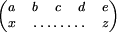
- mathTeX is as simple to use as mimeTeX but uses LaTeX to generate a higher quality image like this
. If you have LaTeX installed you may prefer to install mathTeX as a cgi program on your system. See also mathTeX Helper, Embedding math with replacemath.js (the latter has a bookmarklet for inserting mathematical images in webmail) and How to Install Latex On Blogger/Blogspot.
- HotEqn is a AWT-based Java applet to view and display mathematical equations. Subtitled The IMGless Equation Viewer Applet it cannot be used to create images.
- jsTeXrender is a small JavaScript program which will convert LaTeX code inside pre tags to images. This makes it easy to embed mathematics in any HTML page or in PHP programs such as phpBB or WordPress. It is based on CodeCogs and LatexRender.
- mathurl is a mathematical version of TinyURL.com. It allows you to reference LaTeXed mathematical expressions using a short url. For example, http://mathurl.com/?5v4pjw will show
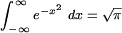 which you can then edit. More details on mathurl’s help page
 - LaTeX for Blogger is a JavaScript add-on for Firefox with Greasemonkey that enables the use of mimeTeX in Blogger posts.
- MathBin.net allows you to quickly post mathematics or physics problems in a forum for others to view and reply to and discuss. The posts are long-lived but not permanent.
- LaTeX word count provides a word count for complete LaTeX documents or for code fragments, with a number of options for parts of the document and whether or not to include mathematics.
- Equations 1.2.1 is an add-on for the email program Thunderbird, which converts LaTeX mathematics into graphics via a Convert button.
- Quick LaTeX is a Google gadget that can be added to the iGoogle homepage. It uses mimeTeX to produce the image but it would be quite simple to change the code to use mathTeX or CodeCogs.
- TeX2PNG Online converts LaTeX code into PNG, GIF, EPS, or JPEG.
- QuickLaTeX.com is a free service which converts LaTeX code to a URL of an image along with meaningful error messages. More detail, support plus a WordPress plugin can be found at the author’s blog.
- jsMath is entitled A Method of Including Mathematics in Web Pages and uses native fonts, which can be resized, rather than using images. It works best (but not exclusively) with TeX fonts.
WordPress and jsMath has instructions for using jsMath in WordPress blogs.
Math support in Sphinx can use both image rendering and jsMath for its document generator. - MathJax is an open source, Ajax-based math display solution which can display MathML or TeX code or a mix of both in the same page. It allows for MathML to be viewed in browsers such as Internet Explorer which don’t have native support and normally require a plug-in. It works with both HTML and XHTML pages. Previews can be found here.
- Google Chart Tools will also display LaTeX code. For example,
is given by the URL
http://chart.apis.google.com/chart?cht=tx&chl=\displaystyle\int_{-\infty}^{\infty}e^{-x^{2}}\;dx=\sqrt{\pi}Various image properties can also be set.
- Latex in Word provides macros for use in Microsoft Word which renders LaTeX code into images inserted into a document. The images can be rendered on the author’s remote server or on a local server.
- MathQuill is a script which allows maths to be added to a web page and will convert LaTeX code typed into a textbox.
- iTeX2Img will convert LaTeX code to a variety of image formats which allows for a choice of font sizes and colours.
- Interactive LaTeX Editor renders in near real-time using a choice of servers, CodeCogs, MathJax and Google Chart API. It can save the results between visits.
B. Complete Documents
Complete LaTeX documents can also be compiled online. Here are a few sites I have come across:
- LaTeX-Online-Compiler will compile LaTeX documents to postscript, PDF or DVI formats and will generate references. There’s a German language version of the page.
- ScienceSoft.at can compile a document to various image formats as well as PDF. The resolution can be adjusted and there are a number of templates. There’s a Flash applet version. Again there’s a German language version.
- TeX on Web converts LaTeX and plain TeX documents to Postscript and PDF. It has Czech language support. The instructions are in Czech but the site is still easy to use by non-Czech speakers.
- MonkeyTeX allows you to upload, store and convert LaTeX documents to PDF in your own account. This makes it possible to collaborate on documents and you can opt to make your PDF documents public and searchable. You can also upload style, bibtex and other files which you can use when compiling LaTeX documents.
- LaTeX Lab is an online version giving a full text editor and compiler complete with menus and toolbars.
“On the Live environment an installation of MikTeX provides the LaTeX processes and packages. A simple C# class library provides an API for interfacing with the MikTeX tools (for tasks such as TeX-to-PDF conversion) as well as the LaTexLab application database which stores users and corresponding file systems. The C# class library is in turn exposed to the Web as an ASP.NET web service which is consumed via AJAX from the LaTexLab application.”
The project is very much under development and the project site is at Google Code. - ScribTeX is a free online collaborative LaTeX editor.
“ScribTeX allows you to work on LaTeX documents from anywhere with internet access and share them with your friends and colleagues easily. Some of the many features of ScribTeX include:- Create and edit LaTeX documents and automatically render them to PDFs;
- Full revision control of all your documents;
- The choice to keep your documents private, allow people of your choosing to view or edit them, or publish them to world. A fine grained permissions system allows for flexible access control.”
- Verbosus is an online LaTeX editor which can”Create and manage your latex projects and generate .pdf files online, directly in your browser, with syntax highlighting.”Registration is required and the service is free for ‘small projects’ using a maximum of 4 resources, though I am uncertain as to the definition of resources.VerbTeX allows you to use Verbosus from an Android device.
- Tex Touch is an app for the iPad. It will edit tex documents and then compile them online using the TeX Cloud online compiling service.
- iLatex2Rtf/i2rtf attempts to convert tex documents to RTF. It will also accept a zip file containing tex, bbl, aux, images, etc. The site makes it clear that it only provides a ‘good starting editing point’.
- ShareLaTeX started in January 2012 and is designed for users to collaborate on documents with changes viewed in real time. It features a customisable editor, simplified error messages, one-click compilation and export of an entire project. It’s in beta at the moment and the site plans to offer a “fully featured free account”.
- blue.publications.li is a collaborative LaTeX editor which allows papers to be shared by using a URL. Changes are received by co-authors within 2 seconds. Compiling using pdflatex or latex is supported.
- writeLaTeX is a free collaborative editor which doesn’t require registration. It has a real-time pdf preview, figures, classes and styles can be uploaded and all the document files can be exported in zip format.
C. Other sites
- LaTeX word count uses a Perl script to count text words in a LaTeX document and has some options to control the count. I’m not sure how useful a word count is for a typical LaTeX document, but this is an easy way to do so.
- WordPress.com offers free hosted blogs with LaTeX facilities similar to LatexRender. See LaTeX — Support — WordPress.com for details.
- LaTeX Symbols Converter will convert accented characters and HTML and XML characters into LaTeX code. For example,
Schrödinger & his cat

Schr\ödinger \&\#38; his cat
will both be converted to
Schr\"{o}dinger \& his cat. - Detexify tries to work out the LaTeX code for any symbol that is mouse-drawn in a box. Thus drawing
 should give a list of symbols including
 \sum,\Sigmaand\Upsigma. The mode or possible packages required are also listed. - LaTeX table editor and BibTeX editor generate the LaTeX code in real-time for tables and BibTeX.
- Pandoc is a converter between many markup formats including LaTeX. Try Pandoc! allows you to convert online small sections of text between these formats.
- Uniquation will search the net for simple TeX expressions.
- WebEquation recognises handwritten mathematics and translates it into LaTeX and mathML, showing the output . Best used with a tablet or digital stylus and requires a browser that supports HTML5.
Please let me know about similar sites that are worth including here.
 on a hosted site